 GradLedger
Quick answer: A homeschool transcript template has your school and student details at the top, a block of courses for each grade (course, level, grade, credits, yearly GPA), a cumulative summary with credits by subject, the grading scale, and a signature line. With GradLedger the template fills itself in: you enter courses and grades, and the GPA and totals are calculated for you.
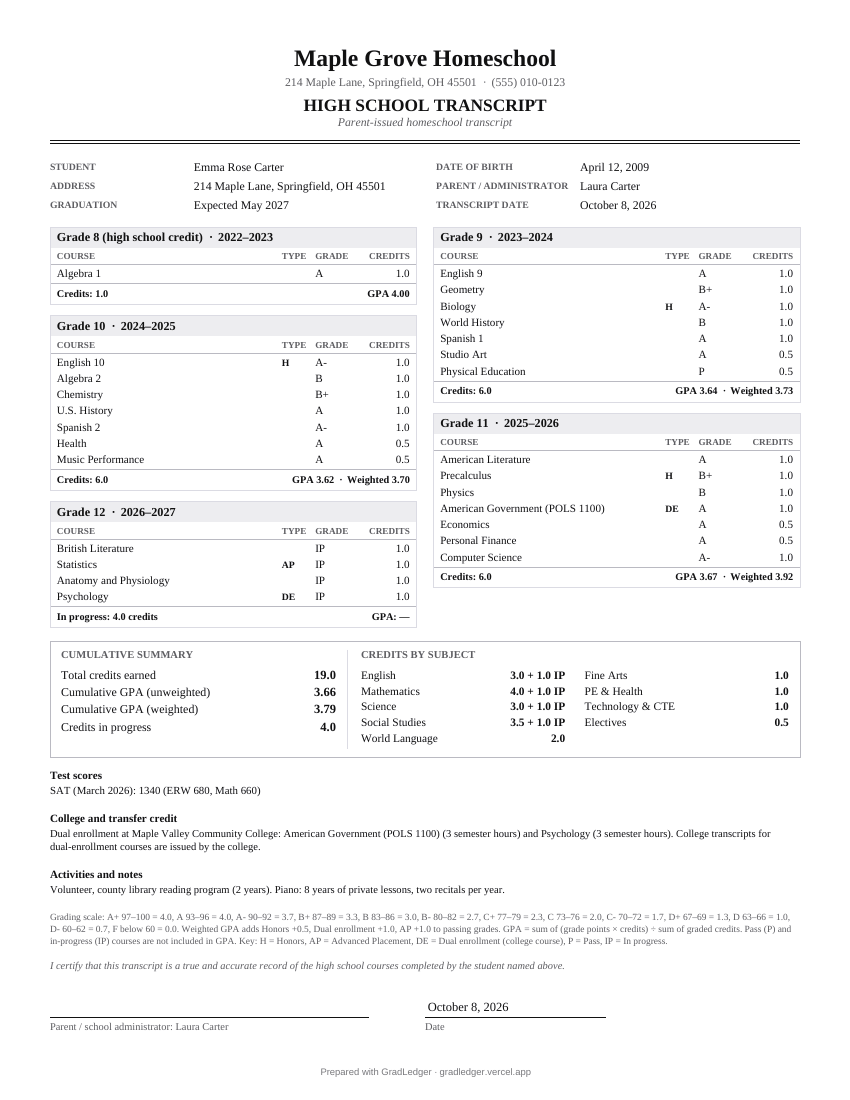
What's in the template
| Part | Filled in from |
|---|---|
| Header | Your homeschool's name, address, phone, email and optional logo or seal. |
| Student details | Name, date of birth, address, parent administrator, graduation date and transcript date. |
| Grade blocks | Courses for grades 9 to 12 (plus high school credit earned in grade 8), each with its level, grade and credits, and the year's credits and GPA. |
| Cumulative summary | Total credits, unweighted and weighted GPA, credits in progress, and credits by subject. |
| Test scores, notes | Optional SAT, ACT, AP or CLEP scores, college and transfer credit notes, activities. |
| Grading key | Your grading scale, weights, the GPA formula and the meaning of H, AP, DE, TR, P and IP. |
| Signature | The administrator's name, an optional drawn or scanned signature, and the date. |
Three designs
- Classic: serif type, centered header and double rule. Traditional and formal.
- Modern: a color band across the top in the color of your choice, with sans-serif type.
- Minimal: black and white, left-aligned, compact.
All three print on US Letter or A4 and fit a typical four-year record on one page. Longer records continue onto a second page with a "continued" header.
By year or by subject?
Transcripts are usually organized by year (grade 9, 10, 11, 12), which shows progress over time and is what most admissions readers expect. A by subject layout groups all English courses together, all math together, and so on. It suits students whose work didn't follow a standard year-by-year pattern. GradLedger's transcript is by year and adds a credits-by-subject summary, so readers get both views. The course descriptions document can be ordered either way.
Template vs a word processor
| Blank document template | GradLedger | |
|---|---|---|
| GPA and credits | Calculated by hand | Calculated exactly, per year and cumulative |
| Adding a course | Re-do the table layout | Type the name and press Enter |
| Grading scale and key | Typed by hand | Added automatically from your settings |
| Editing later | Edit the file | Saved in your browser; backup file for other devices |
| Cost | Usually free | Free |
If you prefer to keep your transcript in a document editor such as Google Docs or Word, you can still use GradLedger to calculate the GPA and credits and copy the numbers in. GradLedger isn't affiliated with Google or Microsoft.
Frequently asked questions
Is this homeschool transcript template free?
Yes, completely, including all three designs, your logo and a signature. There's no signup. Each PDF has one small "Prepared with GradLedger" line at the bottom.
Can I edit the transcript after downloading?
Edit your courses in GradLedger and download a new PDF. Your records stay saved in your browser, so updating the transcript each year takes a minute.
Does the template fit on one page?
A typical four-year record of 6 to 8 courses a year fits on one page. Longer records continue onto a second page with a continued header and page numbers.
Can I add a school logo or seal?
Yes, free. Upload an image on the Student tab. Only use a logo for your own homeschool, never the name or seal of another institution.
What should not go on a homeschool transcript?
Leave off anything you can't support, such as courses that weren't completed or labels like AP without an authorized course. Don't claim accreditation you don't have. Keep personal details to what's needed: name, date of birth, address and graduation date.
More homeschool record tools
Last updated · Written by the MiniTools team. GradLedger is general information and a record-keeping tool, not legal advice. Homeschool laws and college requirements vary; check your state's rules and each college's admissions requirements.